Riley_Nilsen
Work
About
WTW - ESS Next Design System
Compiling design and implementation guidelines in Zeroheight to ensure consistent development sitewide.

To increase the speed of design to development, I was tasked with creating a new and updated design system. One of the major goals with this new design system, was to reduce enterprise wide friction when handing off finished UX design solutions to cross functional development teams. The other driving factor in the creation of this design system, was a Product team request to improve accessibility sitewide to meet WCAG compliance and obtain our site VPAT. This sitewide effort allowed us to create a 32% increase in development time while creating a fully accessible site.
Tools
Figma
Zeroheight
The Problem
Between 6 UX Designers and over a dozen cross functional development teams, there was no up to date design system to guide the development of our product. This meant there was a lot of back and forth between designers and developers when design or implementation questions came about, especially in regards to accessibility. In order to solve this and reduce friction during design handoffs, I led the creation of a new and updated Design System as a source of truth to guide both design and implementation.
Challenges
- Scalability: I needed to put together a design system that we could easily expand with the addition of new components or guidelines and still provide information around accessible implementation
- Cross-Platform Consistency: Ensuring a consistent look and feel for both desktop and mobile users while still implementing designs that met accessibility standards
Process
Research
How does one make a design system that guides the creation of a consistent user experience across our site?
Identify our needs
What design practices and principles needed to be outlined in our design system?
Creation
How should all of this information be compiled in a way that’s useful to our teams?
Research
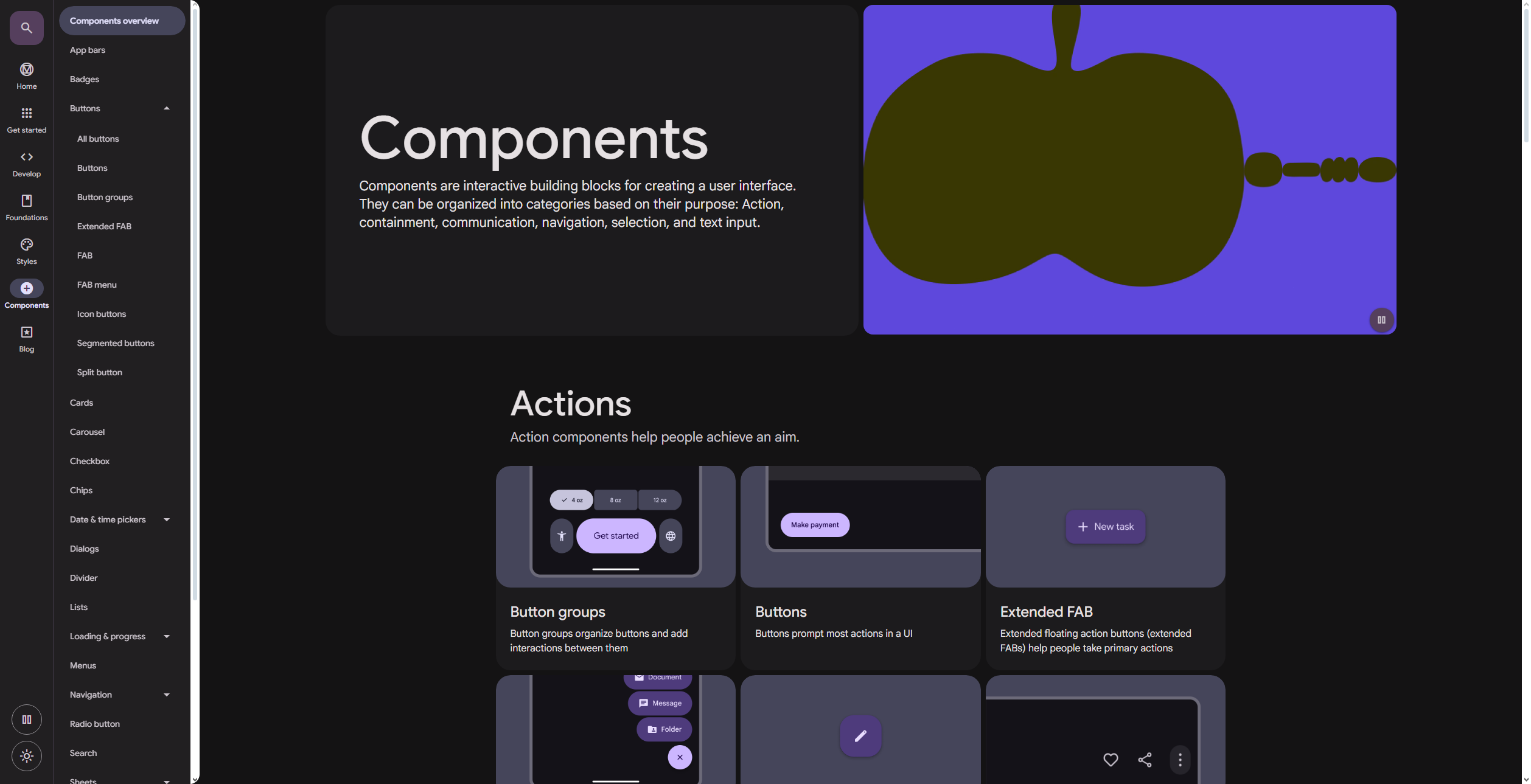
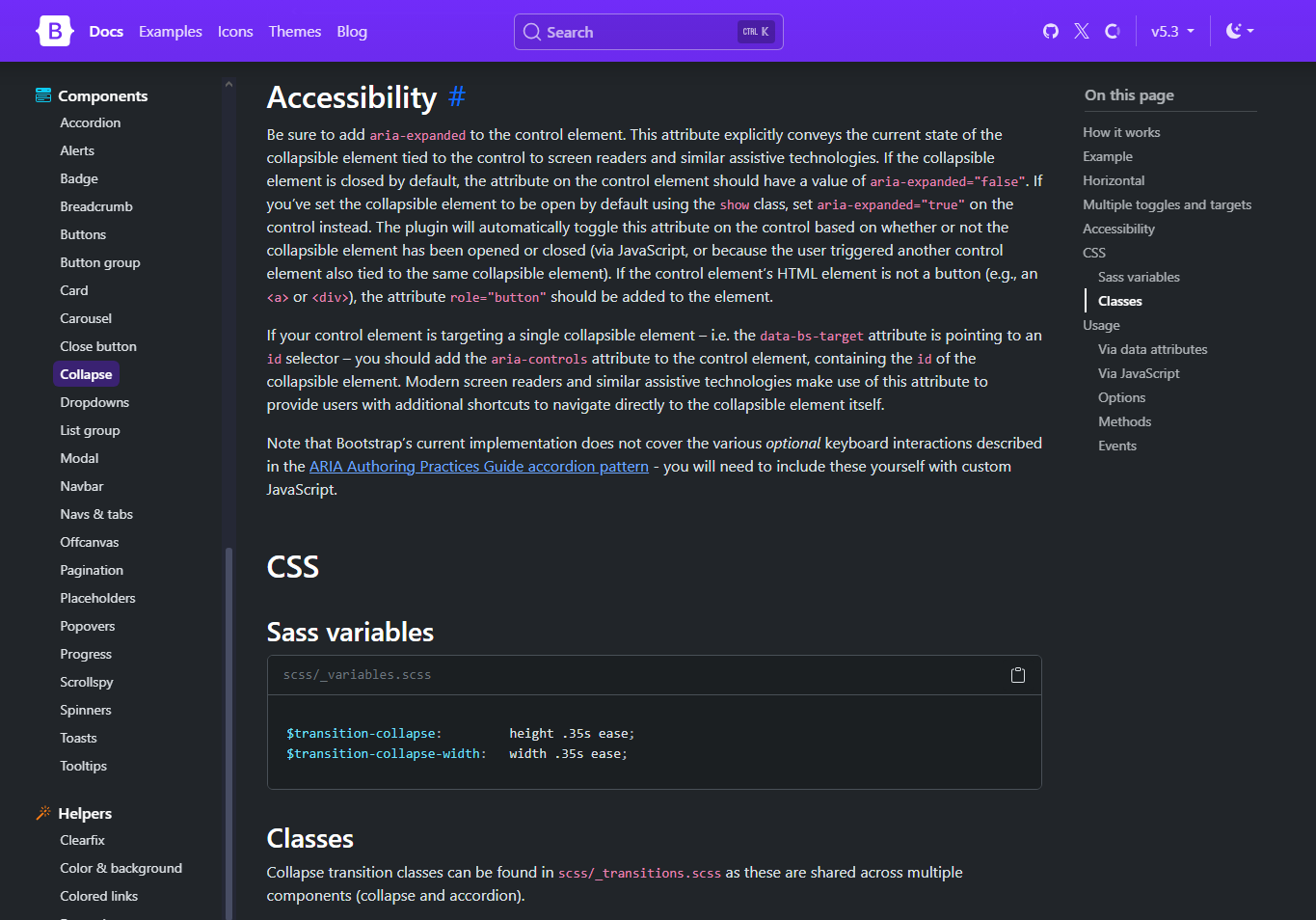
To ensure this new design system met the needs of designers and developers alike, I took a look at what made a Design System an effective tool. To do this I looked at various design systems available to the public. The two major ones I took inspiration from were Material Design and Bootstrap.
- Material Design provided a great breakdown of each component's definition, intended use, and in depth accessibility guidelines when using each component as intended
- Bootstrap gave good in depth examples of how to make components accessible from a development standpoint
Identify our needs
The next step in creating this new design system was to identify what guidelines used in our system needed to be outlined in order to create a consistent and accessible experience across the entire site
- What styles create a consistent tone and experience sitewide
- Define the contents of our component library and how they need to be built to be fully accessible
- What design principles need to be followed in order to create a consistent and WCAG compliant experience
Creation
To begin compiling this design system, I took all of the best practices, components, and accessibility guidelines and organized them in Zeroheight to distribute amongst our cross functional teams.
Guiding Principles
Define design and implementation patterns to create consistency across the site
Styleguide
Compile color palette and typography guidelines to ensure correct and consistent implementation that created a hierarchy of information and consistent tone of voice
Components
Outline usage and accessibility guidelines for component library to create an accessible and consistent experience that matched the WTW brand that could be used by each of our clients
Accessibility
I used this design system to work with my development team and rebuild portions of our site to meet the WCAG accessibility standards. This was done in order to obtain our VPAT and was a 9 month endeavor. It involved working closely with Stakeholders, Product Owner, Developers, Business Analysts, and Quality Analysts.
Accessibility Issues
The main accessibility issues that we needed to fix included:
- Tab order and overall keyboard accessibility
- Aria labeling within various components for screen reader users
- Improvement of Headlines for screen reader users
Riley_Nilsen
Work
About
WTW - ESS Next Design System
Compiling design and implementation guidelines in Zeroheight to ensure consistent development sitewide.
To increase the speed of design to development, I was tasked with creating a new and updated design system. One of the major goals with this new design system, was to reduce enterprise wide friction when handing off finished UX design solutions to cross functional development teams. The other driving factor in the creation of this design system, was a Product team request to improve accessibility sitewide to meet WCAG compliance and obtain our site VPAT. This sitewide effort allowed us to create a 32% increase in development time while creating a fully accessible site.
Tools
Figma
Zeroheight
The Problem
Between 6 UX Designers and over a dozen cross functional development teams, there was no up to date design system to guide the development of our product. This meant there was a lot of back and forth between designers and developers when design or implementation questions came about, especially in regards to accessibility. In order to solve this and reduce friction during design handoffs, I led the creation of a new and updated Design System as a source of truth to guide both design and implementation.
Challenges
- Scalability: I needed to put together a design system that we could easily expand with the addition of new components or guidelines and still provide information around accessible implementation
- Cross-Platform Consistency: Ensuring a consistent look and feel for both desktop and mobile users while still implementing designs that met accessibility standards
Process
Research
How does one make a design system that guides the creation of a consistent user experience across our site?
Identify our needs
What design practices and principles needed to be outlined in our design system?
Creation
How should all of this information be compiled in a way that’s useful to our teams?
Research
To ensure this new design system met the needs of designers and developers alike, I took a look at what made a Design System an effective tool. To do this I looked at various design systems available to the public. The two major ones I took inspiration from were Material Design and Bootstrap.
- Material Design provided a great breakdown of each component's definition, intended use, and in depth accessibility guidelines when using each component as intended
- Bootstrap gave good in depth examples of how to make components accessible from a development standpoint
Identify our needs
The next step in creating this new design system was to identify what guidelines used in our system needed to be outlined in order to create a consistent and accessible experience across the entire site
- What styles create a consistent tone and experience sitewide
- Define the contents of our component library and how they need to be built to be fully accessible
- What design principles need to be followed in order to create a consistent and WCAG compliant experience
Creation
To begin compiling this design system, I took all of the best practices, components, and accessibility guidelines and organized them in Zeroheight to distribute amongst our cross functional teams.
Guiding Principles
Define design and implementation patterns to create consistency across the site
Styleguide
Compile color palette and typography guidelines to ensure correct and consistent implementation that created a hierarchy of information and consistent tone of voice
Components
Outline usage and accessibility guidelines for component library to create an accessible and consistent experience that matched the WTW brand that could be used by each of our clients
Accessibility
I used this design system to work with my development team and rebuild portions of our site to meet the WCAG accessibility standards. This was done in order to obtain our VPAT and was a 9 month endeavor. It involved working closely with Stakeholders, Product Owner, Developers, Business Analysts, and Quality Analysts.
Accessibility Issues
The main accessibility issues that we needed to fix included:
- Tab order and overall keyboard accessibility
- Aria labeling within various components for screen reader users
- Improvement of Headlines for screen reader users
Riley_Nilsen
Work
About
WTW - ESS Next Design System
Compiling design and implementation guidelines in Zeroheight to ensure consistent development sitewide.
To increase the speed of design to development, I was tasked with creating a new and updated design system. One of the major goals with this new design system, was to reduce enterprise wide friction when handing off finished UX design solutions to cross functional development teams. The other driving factor in the creation of this design system, was a Product team request to improve accessibility sitewide to meet WCAG compliance and obtain our site VPAT. This sitewide effort allowed us to create a 32% increase in development time while creating a fully accessible site.
Tools
Figma
Zeroheight
The Problem
Between 6 UX Designers and over a dozen cross functional development teams, there was no up to date design system to guide the development of our product. This meant there was a lot of back and forth between designers and developers when design or implementation questions came about, especially in regards to accessibility. In order to solve this and reduce friction during design handoffs, I led the creation of a new and updated Design System as a source of truth to guide both design and implementation.
Challenges
- Scalability: I needed to put together a design system that we could easily expand with the addition of new components or guidelines and still provide information around accessible implementation
- Cross-Platform Consistency: Ensuring a consistent look and feel for both desktop and mobile users while still implementing designs that met accessibility standards
Process
Research
How does one make a design system that guides the creation of a consistent user experience across our site?
Identify our needs
What design practices and principles needed to be outlined in our design system?
Creation
How should all of this information be compiled in a way that’s useful to our teams?
Research
To ensure this new design system met the needs of designers and developers alike, I took a look at what made a Design System an effective tool. To do this I looked at various design systems available to the public. The two major ones I took inspiration from were Material Design and Bootstrap.
- Material Design provided a great breakdown of each component's definition, intended use, and in depth accessibility guidelines when using each component as intended
- Bootstrap gave good in depth examples of how to make components accessible from a development standpoint
Identify our needs
The next step in creating this new design system was to identify what guidelines used in our system needed to be outlined in order to create a consistent and accessible experience across the entire site
- What styles create a consistent tone and experience sitewide
- Define the contents of our component library and how they need to be built to be fully accessible
- What design principles need to be followed in order to create a consistent and WCAG compliant experience
Creation
To begin compiling this design system, I took all of the best practices, components, and accessibility guidelines and organized them in Zeroheight to distribute amongst our cross functional teams.
Guiding Principles
Define design and implementation patterns to create consistency across the site
Styleguide
Compile color palette and typography guidelines to ensure correct and consistent implementation that created a hierarchy of information and consistent tone of voice
Components
Outline usage and accessibility guidelines for component library to create an accessible and consistent experience that matched the WTW brand that could be used by each of our clients
Accessibility
I used this design system to work with my development team and rebuild portions of our site to meet the WCAG accessibility standards. This was done in order to obtain our VPAT and was a 9 month endeavor. It involved working closely with Stakeholders, Product Owner, Developers, Business Analysts, and Quality Analysts.
Accessibility Issues
The main accessibility issues that we needed to fix included:
- Tab order and overall keyboard accessibility
- Aria labeling within various components for screen reader users
- Improvement of Headlines for screen reader users